Skip to footer
Volkswagen
  • Offers
  • Find a Dealer
  • Search Inventory
  • Models
    • All models
    • SUV Line-up
    • Sedan Line-up
    • Compact Line-up
    • EV Line-up
  • Shop
    • Current Offers
    • Search Inventory
    • Financing & Leasing
      • Vehicle Protection Plans
      • Purchase Programs
    • Certified Pre-Owned Program
    • DriverGear - Apparel & Gear
    • Vehicle Accessories
    • Fleet
    • Introduction to EVs
  • Owners
    • About My Vehicle
      • Owner's Manuals
      • Recalls
      • Warning & Indicator Lights
      • Vehicle Software Updates
      • How-To Videos & Guides
      • Warranty & Maintenance Information
    • Service & Maintenance
      • Schedule Service
      • Maintenance Coverage
      • Maintenance Schedule
      • Roadside Assistance
      • Certified Collision Repair
      • Genuine Volkswagen Service
      • Express Service
      • Post-Service Towing Coverage
      • EV Service
      • Service and Parts Financing
    • Parts and Accessories
      • Vehicle Accessories
      • Parts
      • Tires & Wheels
      • Service & Parts Financing
    • My Financial Account
      • Accounts & Payments
      • Financial FAQs
      • Service & Parts Financing
      • Trade In and Upgrade Options
    • Apps & Connected Services
      • myVW App
      • Vehicle Software Updates
      • Connected Services & Plans
      • SiriusXM
    • Ownership Benefits
    • EV Ownership & Charging Benefits
    • Driver Accessibility Program
    • Certified Pre-Owned Benefits
  • About VW
    • Mission and Values
    • Our History
    • Corporate Information
    • Brand & Community
    • DriverGear - Apparel & Gear
    • Our U.S. Soccer Federation Partnership
    • Newsroom
    • Shaped by the People
  • Find A Volkswagen Dealer
  • Help & Support

About Volkswagen

  • Why VW
  • Contact Us
  • Help Center
  • Careers
  • Corporate Information
  • Newsroom
  • US Media Site
  • Decarbonization Statements

Shop

  • SUVs
  • EVs
  • Compacts
  • Sedans
  • Certified Pre-Owned
  • Build & Price
  • Current Offers
  • Find a Dealer
  • Financing & Leasing
  • Fleet
  • Carefree Shopping

Owners

  • About My Vehicle
  • Schedule Service
  • Apps & Connected Services
  • Ownership Benefits
  • Recalls
  • Roadside Assistance
  • TDI Emissions Modification Lookup
  • In-Use Verification Program (IUVP)
  • Driver Accessibility Program

Social Media

  • Facebook
  • Instagram
  • X
  • YouTube
  • TikTok
  • LinkedIn
  • English
  • Español
  • AdChoices
  • Privacy Statement
  • Website Terms of Use
  • Do Not Sell or Share My Personal Information for Targeted Advertising
  • Cookie Settings
  • California Consumer Notice
  • Electric Vehicle Battery Label
  • How to Disconnect Remote Vehicle Access
  • Industry Guidance for Emergency Responders
© 2026 Volkswagen of America, Inc.

Disclaimer by Volkswagen

  1. Volkswagen of America, Inc., believes the information and specifications in this website to be correct at the time of publishing. Model specifications provided may vary based on selected trim, options, and installed accessories. Specifications, standard features, options, fabrics, accessories and colors are subject to change without notice. Some features may be unavailable when your vehicle is built. Some vehicles are pictured with options that may be available at extra cost or may not be available on some models. Ask your dealer about the availability of options and verify that the vehicle you ordered includes the equipment you ordered.
  2. Computer generated image shown. Images of vehicles are for illustrative purposes only. Please see dealer for details and availability.

Plug&Charge

Plug&Charge: Enjoy the convenience

The Electrify America charging plan⁠⁠ included with your all‑electric 2025 ID. Buzz comes with the convenience of Plug&Charge⁠.⁠ By activating this feature in the Electrify America app, you can save time when charging—you’ll simply plug in your ID. Buzz at an Electrify America station and, once the connection is established, it will start charging. It’s as simple as that.

  1. 2.
    Plug&Charge can only be used at Electrify America DC fast charging and Level 2 public charging stations. The feature is available for use upon purchase of a new, unused 2025 ID. Buzz EV and can only be utilized by the original purchaser/owner for the duration of the included charging plan. Not valid for subsequent owners. Functionality will deactivate upon expiration of the included 3-year charging plan, which begins upon vehicle purchase. Requires Electrify America mobile app, account, enrollment in the included ID. Buzz charging plan, acceptance of Plan Disclosure, set up of payment method and activation of Plug&Charge in the Electrify America app. Activation usually takes a few minutes but may take longer depending on your vehicle and its cellular connectivity.
Learn how to activate Plug&Charge
Learn how to use Plug&Charge
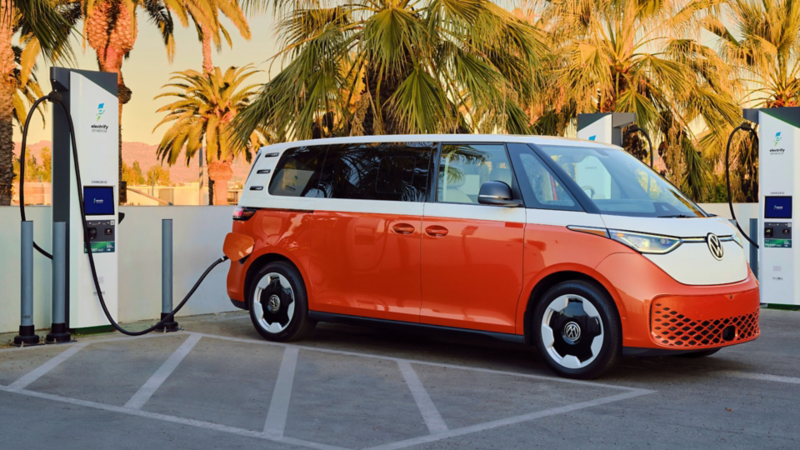
Side view of an ID. Buzz shown in Energetic Orange Metallic and Candy White parked at a charging station with palm trees in the background.

How to Activate Plug&Charge

If you’ve already downloaded the Electrify America app and enrolled in the included charging plan ⁠for your ID. Buzz EV, here’s how to activate Plug&Charge⁠:

  • Step 1: Open the Electrify America app 
  • Step 2: Tap “Account” in the lower right of the app screen 
  • Step 3: Tap “Plans” and then the ID.4 charging plan
  • Step 4: Scroll down to the Plug&Charge section and tap “Activate now” 
  • Step 5: Tap the green “Activate Plug&Charge” button and tap “OK”
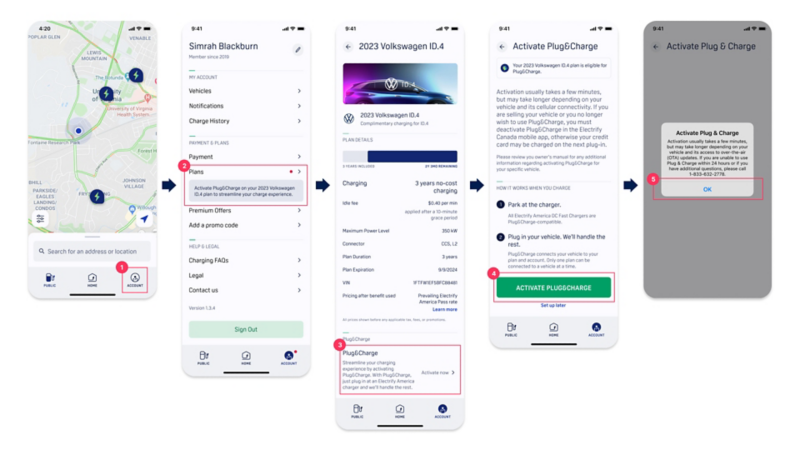
Five Electrify America app screens showing the steps to activate Plug&Charge if the app is already downloaded.
If you encounter any problems, please call Electrify America Customer Assistance at 1-833-632-2778. They are available 24/7.

If you haven’t yet downloaded the Electrify America app or enrolled in the included charging plan for your ID. Buzz EV, here’s how to activate Plug&Charge:

  • Step 1: Follow general enrollment instructions here
  • Step 2: After you set up payment for any idle fees or taxes you may incur, an “Activate Plug&Charge” screen will appear 
  • Step 3: Tap the green “Activate Plug&Charge” button and tap “OK”
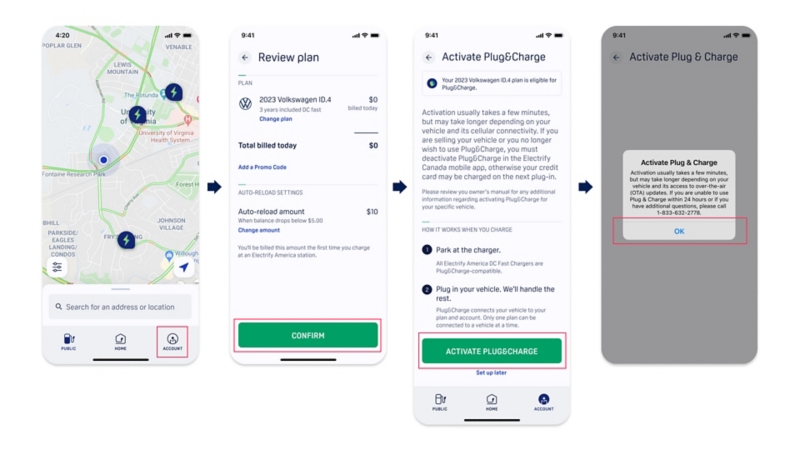
Four Electrify America app screens showing the steps to activate Plug&Charge if the app is not already downloaded.
If you encounter any problems, please call Electrify America Customer Assistance at 1-833-632-2778.

How to use Plug&Charge

Once you’ve done the one-time activation in the Electrify America app, simply:

  • Step 1: Pull up to an available charger at an Electrify America charging station and park 
  • Step 2: Plug the charging connector into your ID. Buzz EV and wait for the vehicle-charger connection to be established 
  • Step: 3: Check the charger screen to ensure charging has begun

Please note that the Plug&Charge⁠2 feature deactivates with the expiry of your included 3-year charging benefit, which begins upon purchase of a new, unused 2025 ID. Buzz EV.

How to use Plug&Charge

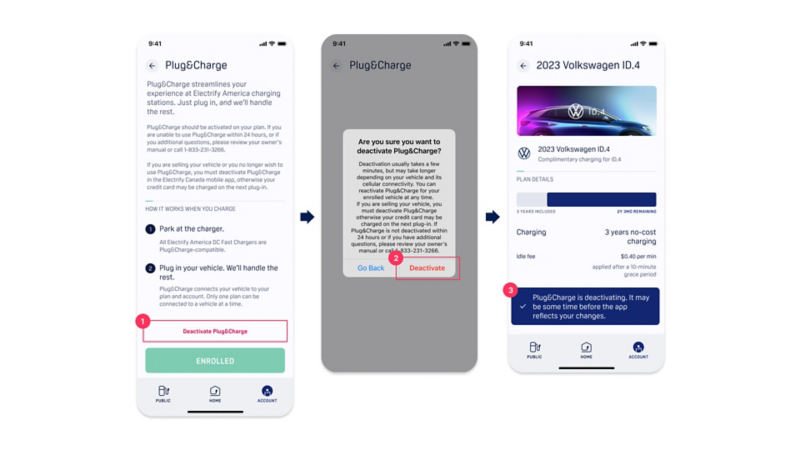
If you are selling your car or simply no longer want Plug&Charge, you can deactivate it:

  • Step 1: Go to the Plug&Charge screen in your ElectrifyAmerica app
  • Step 2: Click the red text at the bottom that says “Deactivate Plug&Charge”
  • Step 3: Click “Deactivate”
Three Electrify America app screens showing the steps to deactivate Plug&Charge.
  • AdChoices
  • Privacy Statement
  • Website Terms of Use
  • Do Not Sell or Share My Personal Information for Targeted Advertising
  • Cookie Settings
  • California Consumer Notice
  • Electric Vehicle Battery Label
  • How to Disconnect Remote Vehicle Access
  • Industry Guidance for Emergency Responders

Disclaimer by Volkswagen

  1. Volkswagen of America, Inc., believes the information and specifications in this website to be correct at the time of publishing. Model specifications provided may vary based on selected trim, options, and installed accessories. Specifications, standard features, options, fabrics, accessories and colors are subject to change without notice. Some features may be unavailable when your vehicle is built. Some vehicles are pictured with options that may be available at extra cost or may not be available on some models. Ask your dealer about the availability of options and verify that the vehicle you ordered includes the equipment you ordered.
  2. Computer generated image shown. Images of vehicles are for illustrative purposes only. Please see dealer for details and availability.
Go to next slide: NACS DC adapter
Public Charging
NACS DC adapter